Operational Notice: WhatsApp Business Price Change
Starting October 1, Meta charges for the messages you send on WhatsApp
Meta updated WhatsApp pricing globally. We now have the official rates, and the change applies to every provider, including Reach. Here’s what changes and how to prepare your operation.
Action required before September 21, 2026 Starting October 1, 2026, if your account has no balance, you won’t be able to send WhatsApp messages. Top up your balance no later than October 1, 2026.
What changes
Meta will start charging for every message (Service/Non-template) your business sends to a customer on WhatsApp, whether it’s sent by a human, an AI, a chatbot, or an automation.
Meta’s official rates
What stays the same: templates used to open a conversation after 24 hours were already charged; that price hasn’t changed.
| Template type | Price |
|---|---|
| Marketing templates | $0.10 USD |
| Utility and Authentication templates | $0.017 USD |
What changes: free-text messages used to assist the customer inside a conversation (“How can I help you?”, “Your order is on its way”) are not templates: they are Service (Non-template) messages.
| Item | Price |
|---|---|
| Service messages (Service / Non-template), starting October 1, 2026 | $0.017 USD |
The first 1,000 messages are free (non-cumulative), per WhatsApp number and per month.
Meta offers 1,000 free service messages per business number. Unused messages don’t roll over, and charges begin at message 1,001.
What you need to do
How does it work? Postpaid → Prepaid
To send WhatsApp messages, you need available balance. Without balance, you won’t be able to send messages from the platform.
Balance is purchased in US$24.00 bundles, and you decide how many bundles to load based on your operation. Credited balance enables message sending.
From the platform you can check your bundle consumption at any time. In addition, once you reach 75% of your balance, we’ll send you a notification so you can plan ahead if you need a new top-up.
How do I know how many messages I send?
What’s charged is the messages your business sends, not the conversations.
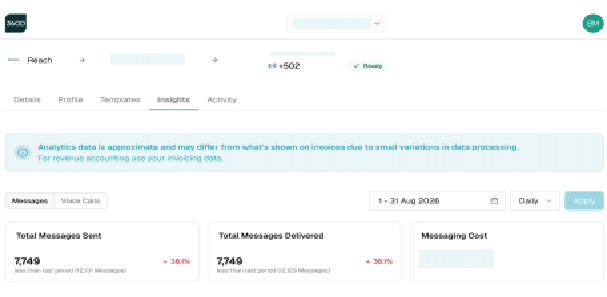
That data is in the Insights tab of your 360dialog account, where you can choose a date range (for example, last month). With that number and the rates above, you can calculate how many bundles you need.
- Log in to 360dialog.
- Can’t access your 360dialog account? Ask us for the report and we’ll send it to you.
This is what that view looks like:
How do I request a top-up?
Until further notice, by writing to billing.agent@reach.tools. Soon you’ll be able to do this from the platform with an affiliated credit card; we’ll let you know when it’s available.
Recommendations to reduce your consumption
1. “Click to WhatsApp” ads on Instagram or Facebook buttons open a 72-hour window in which Meta doesn’t charge for those messages.
-
The customer comes in through a Click to WhatsApp ad or Facebook button and writes in. Customer messages are always free.
-
The business replies within the first 24 hours: that reply is free and opens the special 72-hour window.
Important: the 72 hours start counting from the exact moment the business replies. If the customer writes at 10:00 a.m. and the business replies at 1:00 p.m. (within that first 24 hours), the window runs from 1:00 p.m., not from 10:00 a.m. or any other point.
-
During those 72 hours, messages sent by the business are free.
-
Once the 72 hours pass, the window closes: resuming contact requires a template (Marketing, Utility, or Auth), which does have a cost. If the conversation resumes, every message the business sends is then charged.
2. Redirect traffic toward Instagram and Facebook.
The change only applies to WhatsApp: Instagram and Facebook Messenger remain free. With ads, stories, posts, and reels you can invite your customers to write to you on those channels, lowering your billable volume on WhatsApp.
3. Send more intentional messages: quality, not quantity.
Train your agents to answer in a single message instead of splitting the reply across several sends: fewer messages per conversation, lower cost.
Questions about this change
You can write to soporte@ubiquo.io or bianca.marroquin@ubiquo.io.